Push notifications play a powerful role in engaging users with your app. When used intelligently, push notifications improve app engagement by 88 percent. Yet, there's also a tremendous opportunity to turn users against your app with push notifications.
That same Localytics study? It found that over half of app users think push notifications are “annoying.” These notifications tend to ignore user goals, dismiss context, leverage the wrong tools, among other mistakes.
We created this resource to make sure your push strategy provides the most value to your users. Read on to understand the opportunities push notifications provide for engagement and user experience. You’ll also learn the fundamentals and some advanced techniques that go into designing a better push strategy.
Why Craft a Better Push Notification Strategy
Before diving into the specifics of creating a push notification strategy, let’s take a look at the primary advantages push strategies provide app creators. In this section, you’ll learn how well-crafted push notification strategies can do wonders for re-engaging users and increasing your app’s inherent valueRe-engage Your Users
A Braze study found that on average fewer than 25 percent of users return to an app the day after they download it. That percentage continues to decline every day after the first. Push notifications can help reverse that trend.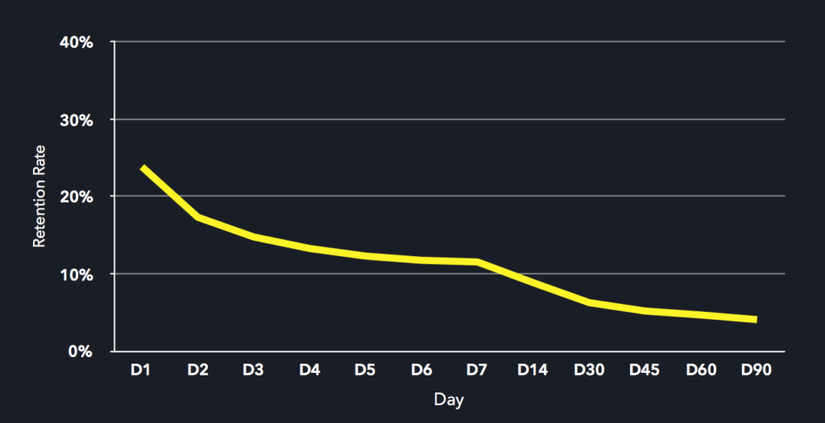
With push notifications, you give your users a direct line back into your app. They only need to tap the notification to go straight into your app, leveraging a single-step pathway to re-engage. Pairing push notifications with deep links lets you go a step further. Deep linking drives your users into a specific screen within your app experience, further simplifying the journey and getting them closer to the action you want them to take.
For example, say a customer abandoned your app after putting a pair of shoes into their shopping cart without checking out. You could send that customer a push notification with a reminder to return to the app to complete the purchase. On tap, the notification would send the customer back into his or her cart, shoes at the ready, to check out.
Push notifications give you an opportunity to interact with users when they're not in your app. Your notifications appear right in their eye-line as they pick up their device, making them powerful tools for driving users back into your app experience. Notifications have even transcended smartphones. Users now see or hear them on the web and other smart devices like watches, digital assistants, and displays.
With push notifications, you give your users a direct line back into your app. They only need to tap the notification to go straight into your app, leveraging a single-step pathway to re-engage. Pairing push notifications with deep links lets you go a step further. Deep linking drives your users into a specific screen within your app experience, further simplifying the journey and getting them closer to the action you want them to take.
Improve Your User Experience
While some products treat push notifications as way to drive unengaged users back into the app experience, others rely on push as a core part of the experience itself. These products use push to give their users exactly what they want when they want it, even if they're not in the app.How to Create Your Push Notification Campaign Strategy
Now that you understand the benefits, how do you go about planning and creating push notifications for your app? This section runs through the four key steps to crafting an effective strategy for your push notification campaign. We examine these steps in relation to how we crafted one of several push notification campaigns for Jellies, a kids video app.Step 1: Identify the Problem and Goal
The first step in creating a push notification campaign is identifying its purpose. Is there a problem you're trying to solve or a goal you want to meet? Once you understand the problem or goal, you can define success.For example, are you noticing that users aren't taking the actions you want them to take? Are they leaving your app? Are they leaving your app at a certain point in your user experience? These are all common problems that push notifications can help solve.
Step 2: Understand the Context
To craft an effective push notification campaign you need to meet users where they're at. This means understanding what's important to your users, where your users are coming from, and the potential obstacles in their way before you can design a solution.- Mindset: That is, what are my users' challenges? What do they want? For Jellies we realized that parents are busy, they're focused on other concerns and while they want their children to watch good quality videos, they aren't looking to police every moment of their child's screen time.
- Receptivity: Under what circumstances are my users most receptive to push notifications? We knew that Jellies parents would want to be contacted directly rather than through their children. Parents choose Jellies because the app is free of ads and we don't try to sell anything to their kids. That's a mission we take very seriously. We wanted to be sure not to break that trust by targeting children with our push notifications.
- Needs/Value: When will my users find the most value from a push notification? Jellies adds new topics to the app every week. We wanted to send out notifications soon after the new topics hit the app so families could immediately start watching
Step 3: Create Relevant Parameters
Your push notification campaign needs to target the right people with the right message at the right time. This makes your push notifications relevant, and more effective.To make sure your push campaign is relevant, establish these key parameters based on the context you discovered (above).
User Segmentation and Trigger Criteria
User segmentation means sorting your users into groups based on shared characteristics. Trigger criteria allow you to further group your users by defining what actions (or lack thereof) they need to take before triggering your push campaign. Combined, these parameters help make sure you're sending your push notifications to the right users.
We wanted to target parents who start their free trial or Jellies subscription and add at least one topic to their library but don’t return to the app to add additional topics. This user segment had the following trigger criteria:
- An active free trial or subscription.
- At least one topic in the user's library.
- Active within the app in the last two weeks, but did not add a new topic within those weeks.
Message Type
What exactly do you plan on sending your users? Many of the common types of push notification messages fall into the following categories: informative, geolocated, and check-in.
- Informative: These are your product announcements, reminders, and alerts. They’re used to inform users about important information like new likes or messages, traffic updates, order statuses, or new app features.
- Geolocated: These messages revolve around the user’s current location. They alert the user to new opportunities or information based on geographic parameters. For example, discounts at a nearby store or new shows at a nearby venue.
- Check-in: Important for re-engaging users, check-in messages interact with your user to keep your brand top of mind. These messages tend to focus on inspirational, feel-good information, like celebrating a progress goal or remembering a happy memory. They help strengthen your product’s relationship with its users.
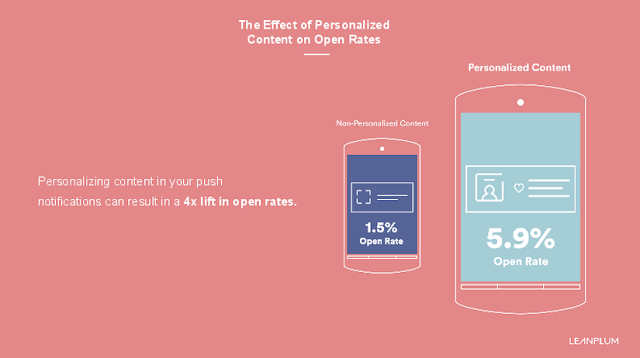
To make the most of your push messages, be succinct, provide value, and prompt the user to take action. You may also want to consider personalization (we talk about this more in-depth later) and adding richness with images, emojis, and gifs to make your messages stand out.
For Jellies, we went with an informative reminder that we’re constantly adding new topics to the app and a call to action to return to Jellies to take advantage of the new content
Send Schedule
That is, when should your users receive your push notification? Use user discovery and research, behavior data, and experimentation to understand the best times to send push notifications to your users.
For this Jellies push notification campaign, we decided to use behavior data to inform our schedule. Instead of sending only in the morning or evening, we timed the message to go out close to the same time the user was last active in the app. This made it more likely that the push notification would reach the user at a more convenient and actionable time.
Remember that your users probably don’t live in the same country or even hemisphere. This makes it critical to ensure that you send notifications based on a user's time zone instead of a blanket send. Failure to do so could mean that while your users in the United States get your notification at a relevant time, your European or Asian users might get their notification in the middle of the night.
Prompt Push Permissions the Right Way
None of the above is useful if your users don't allow your push notifications in the first place. Being strategic about how you prompt for push permissions is especially important for iOS apps.According to Accengage, 91.1 percent of Android users allow push notifications. Now compare that to 43.9 percent of iOS users. This is because Android users must manually opt out of push, while the opposite is true for iOS. The onus is on iOS app creators to convince users to opt in, usually early on in the app experience. Android users typically don't bother opting out unless an app's push strategy is really irritating them.

In our experience, context, transparency, and value are key to setting your push permission prompts up for approval:
- Context: Don't prompt for push notification permission out of the blue. Time it to align with when your user would naturally encounter and understand the value of receiving a push notification.
- Transparency: Tell your users exactly what they should expect from push notifications.
- Value: Explain why your users should allow push notifications from your app.
We sometimes include a soft-ask modal before the official permissions prompt that explains what push notifications are and why they're valuable. We also ask the user if they're interested in receiving push notifications. If they indicate interest, we show them the official prompt. They're more likely to tap "Allow" on the iOS dialog at this point because they've shown intent on the notifications primer screen.
If the user indicates they’re not interested, we don't show them the official prompt. Instead, we try again in another contextual scenario after some time has passed and it feels relevant. This gives the user more opportunity to understand what the app is about, start to trust the app, and begin to see the benefit of push notifications. It also gives us multiple chances to convince the user to allow push notifications.